HEIC will not open or a website only accepts JPG? What to do
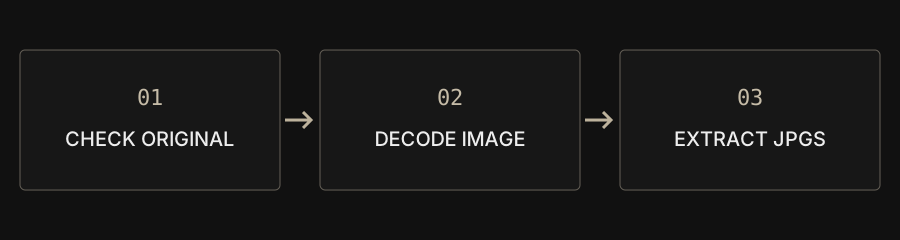
Decode and save a real JPG rather than renaming the extension. CAPYPDF converts locally, but some HDR, multi-image or special HEIC encodings may not be supported.
| Goal | Choose | Remember |
|---|---|---|
| JPEG-only upload form | HEIC → JPG | Extract batch ZIP first |
| PNG required | HEIC → PNG | Output may be larger |
| One photo attachment document | HEIC → PDF | No animation or OCR |
Why does my phone open a photo that a website rejects?
Device support and accepted upload formats differ. An iPhone photo may be HEIC or HEIF while a form allows only JPG, JPEG or PNG. Read the receiving service’s requirements first. Renaming .heic to .jpg changes the label without creating JPEG image data and can still be rejected.
How do batch downloads work?
Add files to HEIC to JPG and review the list before processing. One result downloads as JPG; multiple results download as ZIP. Extract the archive before submitting individual pictures to a form. A batch accepts up to 100 files within the 100 MB combined limit. Smaller batches can be more reliable on a phone.
Will colors, quality and capture metadata stay identical?
The converter re-encodes pictures and may resize very large ones. JPEG is lossy. HDR and color handling can differ across decoders. Capture metadata is not retained, so output is not an archival replacement for the source. Keep original HEIC files if you need camera information, precise color or evidence integrity.
Are bursts and Live Photos preserved?
The workflow handles supported static images. A JPG does not retain the moving part of a Live Photo, depth information or every embedded HEIC image. A decoder returning multiple images can be rejected. Export a normal still from the original photo application when needed, and keep the original media for its full contents.
What should I check after an error?
Make sure the cloud original is downloaded, the file is not empty and the extension has not merely been changed. Open it on the original device and try exporting a normal still. Test an individual failing image rather than repeating the whole batch. Report the browser, tool and a non-sensitive error description without posting private photos publicly.
Should I choose PNG or PDF instead?
Use JPG when that is what the receiving platform accepts. PNG may be larger and cannot restore discarded HEIC information. Choose HEIC to PDF when several photos should form one attachment. Each image becomes a page; this does not preserve animation or add OCR text.